
Integrated Cookie Consent Management
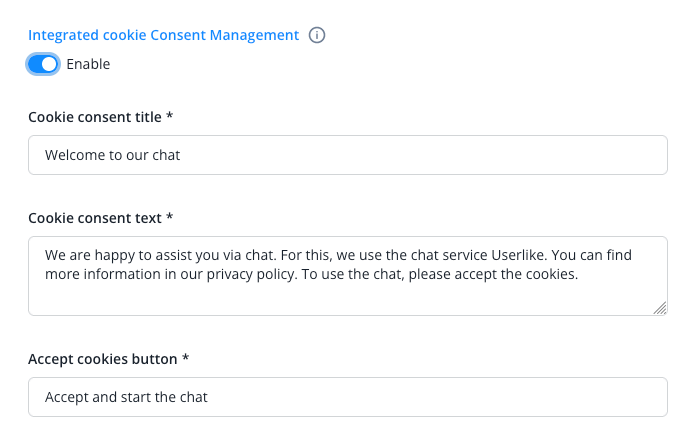
Use our integrated cookie consent management to request consent from your users for the use of Lime Connect chat. You can find more information here.
In case you choose not to use the management, the following information applies to you
Cookie Behavior Without Using the Integrated Cookie Consent Management
To ensure the functionality of our software, we save a cookie about the application status in the end-user's browser. This cookie is technically essential and will populate data only when the chat is being used. Before that its only function is to offer the chat service. This cookie is on your domain and can't be used by Lime Connect to track your visitors in any way.
The Lime Connect Messenger creates a cookie:
uslk_umm_{organization-id}_s
You will find your Organization ID in your Dashboard under Account > Organizations. Select the organization and you will see the ID at the end of your URL.
In addition to the technical details of the widget status and messenger status, the cookie contains IDs of existing contacts so they can be recognized when visiting again ("uuid", "token", "blocked", "client_name", "client_email").
We also use a LocalStorage variable of the same name, it contains the same technical information, and additionally the number of page impressions and page visits ("page_impressions", "visits").
Furthermore, we use a LocalStorage variable with the same name, which contains the same technical information. Additionally, it also reflects the number of page visits and page impressions.
loglevel:userlike: log level for the application
uslk_umm_{organization_id}:
page_impressions: number of page impressions,
visits: number of visits,
restoreableViewState: last restorable state of the Lime Connect Messenger (e.g. while navigating on the website),
lastInteraction: Unix timestamp of the last interaction,
lastProactiveInteraction: Unix timestamp of the last proactive interaction (e.g. proactive bubble was clicked, proactive message was sent),
isBubbleClosed: marker when the user closes the bubble by clicking the X icon in the top right
last_impression: Unix timestamp of the last page impression
New: There is also a LocalStorage variable with the name:
chakra-ui-color-mode: with the value either light or dark, depending on the selected scheme
Note
In case you don't consider our cookies as technically essential we advice you to load the Lime Connect JavaScript code after your user has agreed to your cookie policy. This can be implemented in your Cookie Manager.
Some Website systems, like Borlabs Cookie offer Cookie Manager plugins that allow you to include JavaScript codes, these will only load after the cookies were accepted by your user. Borlabs Cookie offers a template for Lime Connect so you can add our service easily.